Business automation is the half of “AI & Automation” that most employers don’t understand, and it’s the half that delivers the fastest ROI. When we talk to employers about our AI & Automation Level 4 apprenticeship, the “AI” part gets heads nodding. Everyone’s heard of ChatGPT, everyone knows they need to do something about it. But when we get to the “automation” part, we see a blank look. What does automation actually mean in practice? Is it robots on a factory floor? Is it coding?
It’s neither. And once employers see what automation actually looks like in 2026, they usually realise their team is already losing hours every week to tasks a machine could handle in seconds.
“AI gets all the headlines. Automation gets all the results. The most valuable thing our apprentices learn isn’t how to write a prompt. It’s how to look at a business process and say, ‘this doesn’t need a person doing it.’ That’s where the real ROI lives.”
Automation in Plain English
Automation means making business processes run themselves. Instead of a person manually doing the same task over and over: copying data from one system to another, sending a follow-up email, generating a weekly report, routing a support ticket. You set up a workflow that does it automatically, every time, without errors, and without anyone needing to remember.
The tools that make this possible have changed dramatically. A few years ago, you needed a developer. Today, platforms like Zapier, Make.com, and Microsoft Power Automate let anyone (with the right training) build automations using visual drag-and-drop interfaces. No code. No IT department. No six-month project plan. That’s exactly what our AI & Automation Level 4 apprentices learn to do from week one.
“Most of the employers we speak to already have the tools. They’re paying for Zapier or they’ve got Power Automate included in their Microsoft licence. They just don’t have anyone who knows how to use them properly. That’s the gap our apprenticeship fills. You don’t need new software. You need someone trained to unlock what you’ve already got.”
The Numbers: Why Automation Matters Now
The global business automation market hit £135 billion in 2026, and 88% of organisations now use automation in at least one business function, up from 55% in 2023. Organisations implementing workflow automation report an average 40% reduction in labour costs for automated processes. These aren’t theoretical numbers. They’re the kind of results that make finance directors sit up.
Five Real Automation Scenarios (Before & After)
Abstract numbers don’t tell the full story. Here are five scenarios we see in almost every organisation we work with:
1. New Employee Onboarding
A new starter joins the team. HR, IT, payroll, and the line manager all need to do things.
2. Sales Follow-Ups
A prospect fills in your website enquiry form. What happens next?
3. Weekly Reporting
Every Monday, someone spends two hours pulling numbers from three different systems into a spreadsheet.
4. Invoice Processing
Invoices arrive by email. Someone has to extract the details, match them to a PO, and enter them into the accounting system.
5. Support Ticket Routing
Customer support emails land in a shared inbox. Someone reads each one and decides who should handle it.
“When our apprentices build their first automation, usually something simple like automating a report or a follow-up email, you can see the penny drop. They realise they’ve just saved their team an hour a week, forever. That’s the moment the apprenticeship pays for itself, and they’re only in month two.”
The Tools: A 2026 Comparison
There are four platforms your team is most likely to use for business automation in 2026. Each has a different sweet spot, and the right choice depends on your existing tech stack and the complexity of what you want to automate.
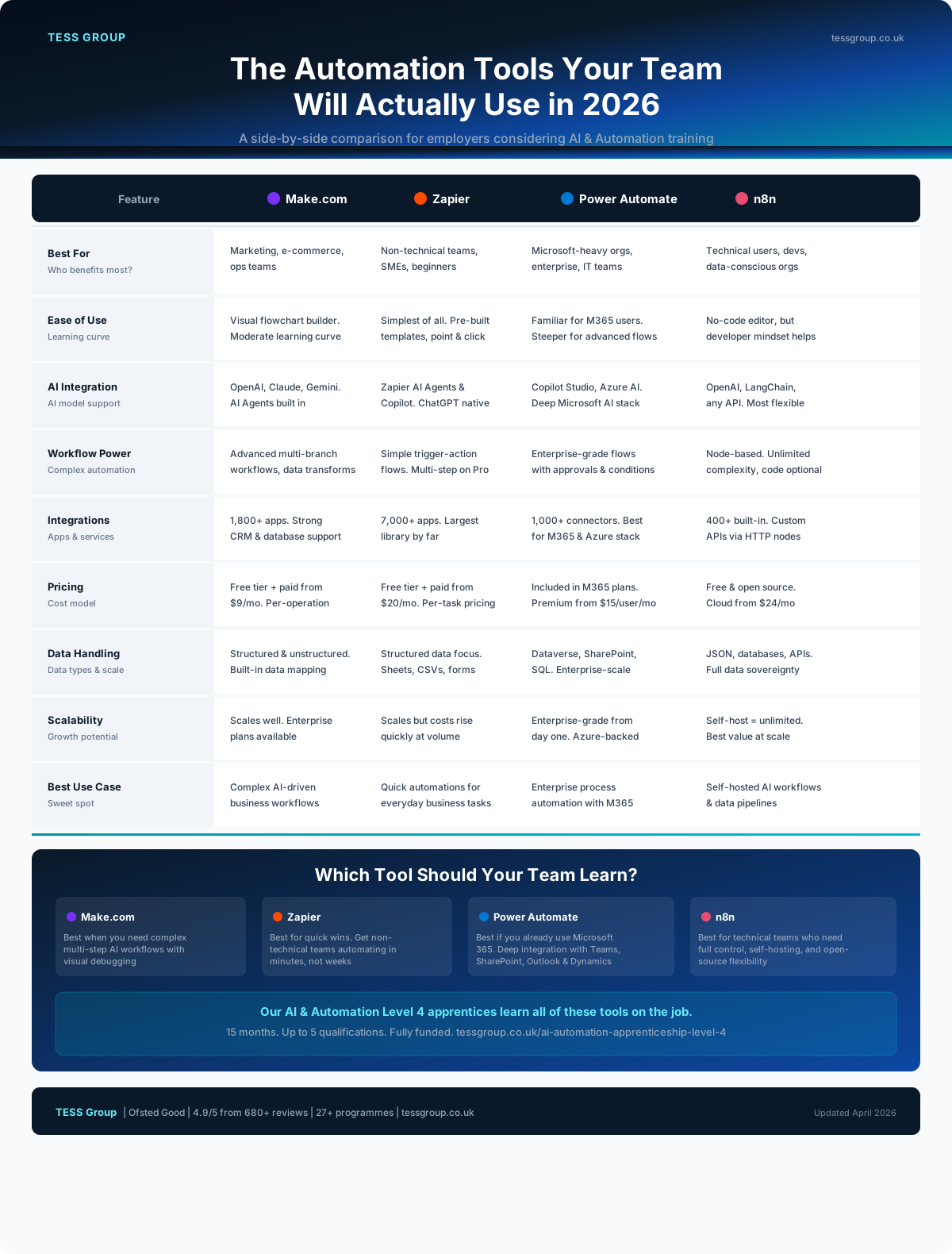 Click to explore interactive version →
Which one should you start with?
If your organisation runs on Microsoft 365 (Outlook, Teams, SharePoint), Power Automate is the natural starting point. It’s included in most M365 licences and integrates deeply with tools your team already uses.
If you want the quickest wins with the least learning curve, Zapier is hard to beat. It connects to over 7,000 apps and most people can build their first automation within an hour.
If you need complex, multi-step workflows that combine AI and data transformation, Make.com is the sweet spot between simplicity and power.
If you have technical users who want full control and data sovereignty, n8n is open source, self-hostable, and the most flexible option available.
Our AI & Automation Level 4 apprentices learn to evaluate all of these platforms and choose the right one for the job. The skill isn’t knowing one tool, it’s knowing which tool fits which problem.
Where AI and Automation Meet
The most powerful business outcomes happen when AI and automation work together. AI provides the intelligence: understanding language, classifying data, making predictions. Automation provides the execution: moving data, triggering actions, connecting systems.
Take the invoice processing example above. AI reads the invoice and extracts the data (that’s the intelligence). Automation matches it to the purchase order, posts it to the accounting system, and notifies the approver (that’s the execution). Neither works as well alone. Together, they turn a 20-minute manual task into a 20-second automated one.
This is exactly why the apprenticeship standard (ST1512) is called AI and Automation Practitioner, not one or the other. The real value is in the combination, and that’s what our programme teaches.
From Strategy to Execution: The L4 + L5 Pathway
Building automations is one thing. Knowing which processes to automate, how to prioritise them, and how automation fits into your wider AI strategy is another. That’s the difference between a practitioner and a leader.
Our AI & Automation Level 4 apprenticeship gives your team the hands-on skills to build and maintain automations. But the real question most senior leaders are asking is: “How do we decide where automation fits in our overall AI strategy?”
That’s exactly what the new AI Leadership Pathway (AU0009/AU0010/AU0011) is designed for. It’s a Level 5 unit launching in April 2026 that teaches senior leaders and managers to develop an AI strategy for their organisation, including where automation delivers the biggest return, how to build a business case for it, and how to lead the change management required to make it stick.
“This is the bit that completes the picture. You’ve got your L4 apprentices who can build the automations, but someone in the organisation needs to be thinking strategically about where those automations should be deployed. The L5 AI Leadership Pathway gives managers the framework to say ‘these are our top 10 processes, here’s the order we automate them, and here’s the ROI case for each one.’ Strategy meets execution.”
“We’ve designed the two programmes to work together. Your senior team does the L5 unit and builds the AI and automation strategy. Your practitioners do the L4 and build the actual workflows. One decides what to automate, the other makes it happen. Both fully funded, both delivered by us.”
Level 4: AI & Automation Practitioner: Your team members build and maintain the automations using Zapier, Make.com, Power Automate, and n8n, alongside AI, data, and cybersecurity skills. 15–18 months, fully funded, up to 5 qualifications.
Getting Started: A Practical First Step
You don’t need to automate everything at once. The best approach is to start with one painful, repetitive process that everyone on the team recognises. Something where people say “I spend ages doing this every week.” That’s your first automation candidate.
Here’s how to find it:
- Ask your team: “What task do you do every week that feels like a waste of your time?”
- Look for the pattern: Is it rule-based? Does it follow the same steps every time? Does it involve moving data between systems?
- Estimate the time: How many hours per week does this task consume across the team?
- Pick your tool: Match the task to the right automation platform based on your existing tech stack.
- Build a pilot: Start small, measure the time saved, and use the evidence to build the case for wider automation.
Or, enrol someone on our AI & Automation Level 4 apprenticeship and they’ll do all of the above as part of their programme, building real automations for your business from month one.
“The employers who get the best results from automation don’t start with the technology. They start with the pain. We tell every employer the same thing: find the task that makes your team groan on a Monday morning. That’s your first automation. Our apprentices will have it running by Tuesday.”
Frequently asked questions.
What is business automation?
Business automation uses software to perform repetitive tasks without human intervention. Instead of an employee manually copying data between systems, sending follow-up emails, or generating reports, an automation tool does it instantly and without errors. Common tools include Zapier, Make.com, Microsoft Power Automate, and n8n.
What is the difference between AI and automation?
Automation follows rules you set: if X happens, do Y. AI makes judgements: given this data, what should I recommend? In practice, the most powerful business results come from combining both, using AI to make decisions and automation to execute them at scale. That’s why the apprenticeship standard is called AI and Automation.
What business tasks can be automated?
Common automations include: sending follow-up emails when a form is submitted, syncing CRM data with accounting software, generating weekly reports from live data, routing support tickets to the right team, onboarding new employees across HR, IT and payroll systems, and posting social media content on a schedule.
How much time can automation save?
Research shows that sales teams save 2–3 hours daily with automation, processing times drop by over 80% for tasks like expense processing and invoicing, and organisations see a 40% reduction in labour costs for automated processes. Most businesses see full ROI within 3–6 months of implementing workflow automation.
Is there a funded automation training programme?
Yes. The AI and Automation Practitioner Level 4 apprenticeship (ST1512) is a 15–18 month programme that teaches employees to build real automations using tools like Zapier, Make.com, and Power Automate alongside AI skills. It’s fully funded through the Apprenticeship Levy and includes up to 5 industry qualifications.